Colorbars and legends
ProPlot includes some useful improvements to the matplotlib API that make working with colorbars and legends much easier.
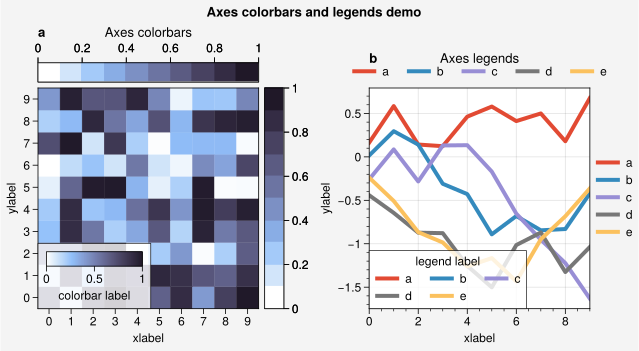
Axes colorbars and legends
In matplotlib, colorbars are added to the edges of subplots
using the figure method matplotlib.figure.Figure.colorbar
(e.g., fig.colorbar(m, ax=ax, location='right').
In ProPlot, this is done using the axes method
proplot.axes.Axes.colorbar (e.g., ax.colorbar(m, loc='r').
proplot.axes.Axes.colorbar preserves subplot aspect ratios and visual symmetry
between subplots by allocating new slots in the proplot.gridspec.GridSpec
rather than “stealing” space from the parent subplot (see the
tight layout section for details). Subsequently
indexing the GridSpec will automatically ignore
slots allocated for colorbars and legends.
ProPlot tries to make the usage of proplot.axes.Axes.colorbar and
proplot.axes.Axes.legend mutually consistent:
Just like
colorbar,proplot.axes.Axes.legendcan draw “outer” legends along the edges of subplots when you request a side location for the legend (e.g.,loc='right'orloc='r'). If you draw multiple colorbars and legends on one side, they are “stacked” on top of each other.Just like
legend,proplot.axes.Axes.colorbarcan draw “inset” colorbars when you request an inset location for the colorbar (e.g.,loc='upper right'orloc='ur'). Inset colorbars have optional background “frames” that can be configured with variouscolorbarkeywords.Both
colorbarandlegendacceptspaceandpadkeywords.spacecontrols the absolute separation of the colorbar or legend from the parent subplot edge andpadcontrols the tight layout padding between the colorbar or legend and the subplot labels.
You can also draw colorbars and legends on-the-fly by supplying keyword arguments
to various plotting commands. To plot data and draw a colorbar or legend in one go,
pass a location (e.g., colorbar='r' or legend='b') to the plotting command
(e.g., plot or contour). Use
legend_kw and colorbar_kw to pass keyword arguments to the colorbar and legend
functions. Note that colorbar can also build colorbars from
groups or arbitrary matplotlib artists – e.g., those created with successive
plot calls (see below).
[1]:
import proplot as pplt
import numpy as np
fig = pplt.figure(share=False, refwidth=2.3)

# Colorbars
ax = fig.subplot(121)
state = np.random.RandomState(51423)
m = ax.heatmap(state.rand(10, 10), colorbar='t', cmap='dusk')
ax.colorbar(m, loc='r')
ax.colorbar(m, loc='ll', label='colorbar label')
ax.format(title='Axes colorbars', suptitle='Axes colorbars and legends demo')

# Legends
ax = fig.subplot(122)
ax.format(title='Axes legends', titlepad='0em')
hs = ax.plot(
    (state.rand(10, 5) - 0.5).cumsum(axis=0), linewidth=3,
    cycle='ggplot', legend='t',
    labels=list('abcde'), legend_kw={'ncols': 5, 'frame': False}
)
ax.legend(hs, loc='r', ncols=1, frame=False)
ax.legend(hs, loc='ll', label='legend label')
fig.format(abc=True, xlabel='xlabel', ylabel='ylabel')
[2]:
import proplot as pplt
import numpy as np
N = 10
state = np.random.RandomState(51423)
fig, axs = pplt.subplots(nrows=2, refwidth='55mm', panelpad='1em', share=False)
fig.format(suptitle='Stacked colorbars demo')

# Repeat for both axes
args1 = (0, 0.5, 1, 1, 'grays', 0.5)
args2 = (0, 0, 0.5, 0.5, 'reds', 1)
args3 = (0.5, 0, 1, 0.5, 'blues', 2)
for j, ax in enumerate(axs):
    ax.format(xlabel='data', xlocator=np.linspace(0, 0.8, 5), title=f'Subplot #{j+1}')
    for i, (x0, y0, x1, y1, cmap, scale) in enumerate((args1, args2, args3)):
        if j == 1 and i == 0:
            continue
        data = state.rand(N, N) * scale
        x, y = np.linspace(x0, x1, N + 1), np.linspace(y0, y1, N + 1)
        m = ax.pcolormesh(x, y, data, cmap=cmap, levels=np.linspace(0, scale, 11))
        ax.colorbar(m, loc='l', label=f'dataset #{i+1}')
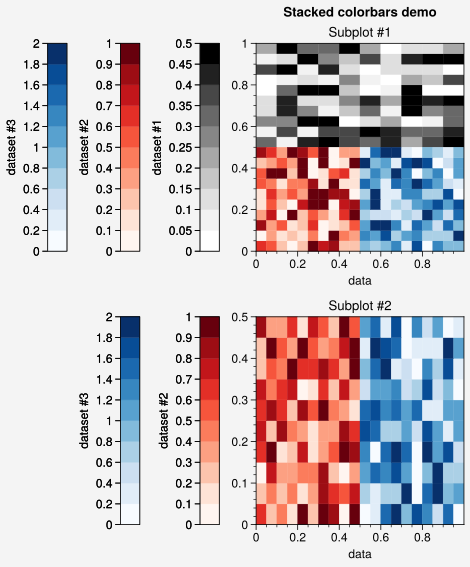
Figure colorbars and legends
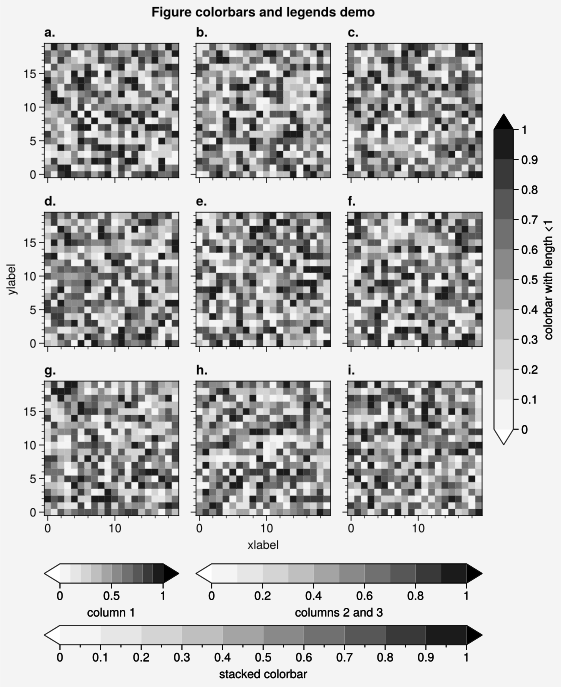
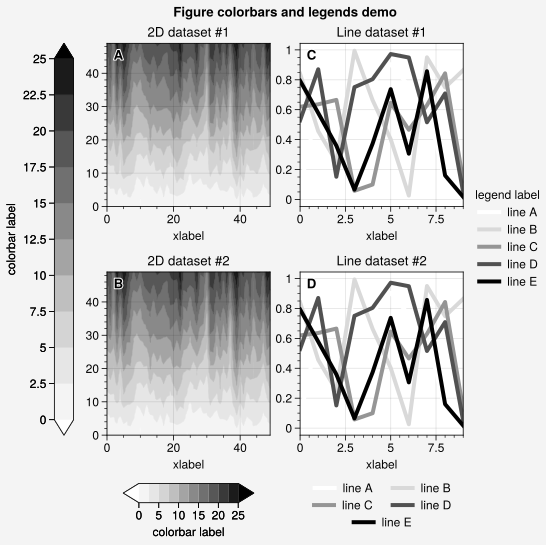
In ProPlot, colorbars and legends can be added to the edge of figures using the
figure methods proplot.figure.Figure.colorbar and proplot.figure.Figure.legend.
These methods align colorbars and legends between the edges of the subplot grid
rather than the figure. As with axes colorbars and legends,
if you draw multiple colorbars or legends on the same side, they are stacked on
top of each other. To draw a colorbar or legend alongside particular row(s) or
column(s) of the subplot grid, use the row, rows, col, or cols keyword
arguments. You can pass an integer to draw the colorbar or legend beside a
single row or column (e.g., fig.colorbar(m, row=1)), or pass a tuple to
draw the colorbar or legend along a range of rows or columns
(e.g., fig.colorbar(m, rows=(1, 2))). The space separation between the subplot
grid edge and the colorbars or legends can be controlled with the space keyword,
and the tight layout padding can be controlled with the pad keyword.
[3]:
import proplot as pplt
import numpy as np
state = np.random.RandomState(51423)
fig, axs = pplt.subplots(ncols=3, nrows=3, refwidth=1.4)
for ax in axs:
    m = ax.pcolormesh(
        state.rand(20, 20), cmap='grays',
        levels=np.linspace(0, 1, 11), extend='both'
    )
fig.format(
    suptitle='Figure colorbars and legends demo',
    abc='a.', abcloc='l', xlabel='xlabel', ylabel='ylabel'
)
fig.colorbar(m, label='column 1', ticks=0.5, loc='b', col=1)
fig.colorbar(m, label='columns 2 and 3', ticks=0.2, loc='b', cols=(2, 3))
fig.colorbar(m, label='stacked colorbar', ticks=0.1, loc='b', minorticks=0.05)
fig.colorbar(m, label='colorbar with length <1', ticks=0.1, loc='r', length=0.7)
[3]:
<matplotlib.colorbar.Colorbar at 0x7f7449284cd0>
[4]:
import proplot as pplt
import numpy as np
state = np.random.RandomState(51423)
fig, axs = pplt.subplots(
    ncols=2, nrows=2, order='F', refwidth=1.7, wspace=2.5, share=False
)

# Plot data
data = (state.rand(50, 50) - 0.1).cumsum(axis=0)
for ax in axs[:2]:
    m = ax.contourf(data, cmap='grays', extend='both')
hs = []
colors = pplt.get_colors('grays', 5)
for abc, color in zip('ABCDEF', colors):
    data = state.rand(10)
    for ax in axs[2:]:
        h, = ax.plot(data, color=color, lw=3, label=f'line {abc}')
    hs.append(h)

# Add colorbars and legends
fig.colorbar(m, length=0.8, label='colorbar label', loc='b', col=1, locator=5)
fig.colorbar(m, label='colorbar label', loc='l')
fig.legend(hs, ncols=2, center=True, frame=False, loc='b', col=2)
fig.legend(hs, ncols=1, label='legend label', frame=False, loc='r')
fig.format(abc='A', abcloc='ul', suptitle='Figure colorbars and legends demo')
for ax, title in zip(axs, ('2D {} #1', '2D {} #2', 'Line {} #1', 'Line {} #2')):
    ax.format(xlabel='xlabel', title=title.format('dataset'))
Colorbar features
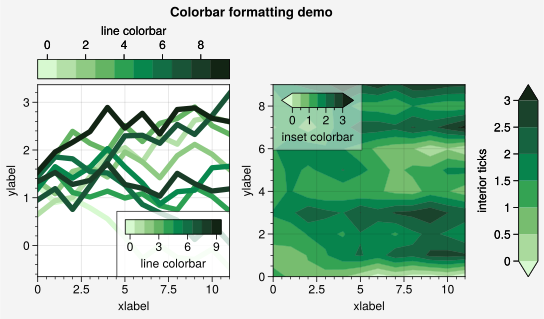
The proplot.figure.Figure.colorbar and proplot.axes.Axes.colorbar commands
include several new, unique features. Instead of a ScalarMappable,
you can pass colormap names, Colormap instances, lists of
colors, or lists of Artist instances to colorbar and
a ScalarMappable will be built from these colors on-the-fly. The
associated colormap normalizer can be specified with the norm and
norm_kw keywords. Lists of artists are passed when you use the colorbar keyword
with 1D plot commands like plot.
The colorbar ticks can be manually specified with values, or ProPlot will infer
them from the Artist labels (non-numeric labels will be
applied to the colorbar as tick labels). This feature is useful for labeling
discrete plot elements that bear some numeric relationship to each other.
Similar to proplot.axes.CartesianAxes.format, you can flexibly specify
major tick locations, minor tick locations, and major tick labels using the
locator, minorlocator, formatter, ticks, minorticks, and ticklabels
keywords. These arguments are passed through the Locator and
Formatter constructor functions.
You can easily toggle minor ticks using tickminor=True, and you can change the
colorbar width and length with the width and length keywords. Note that the width
is now specified in physical units – this helps avoid the common
issue where colorbars look “too skinny” or “too fat” and preserves the look of the
figure when its size is changed. The default widths for outer and inset colorbars are
controlled with rc['colorbar.width'] and rc['colorbar.insetwidth'], and the
default length for inset colorbars is controlled with rc['colorbar.insetlength']
(the outer colorbar length is always relative to the subplot grid, with a default
value of 1). You can also specify the size of the colorbar “extensions” in
physical units rather than relative units using the extendsize keyword rather
than matplotlib’s extendfrac. The default sizes for outer and inset colorbars are
controlled with rc['colorbar.extend'] and rc['colorbar.insetextend']. See
the colorbar documentation for details.
[5]:
import proplot as pplt
import numpy as np
fig = pplt.figure(share=False, refwidth=2)

# Colorbars from lines
ax = fig.subplot(121)
state = np.random.RandomState(51423)
data = 1 + (state.rand(12, 10) - 0.45).cumsum(axis=0)
cycle = pplt.Cycle('algae')
hs = ax.line(
    data, lw=4, cycle=cycle, colorbar='lr',
    colorbar_kw={'length': '8em', 'label': 'line colorbar'}
)
ax.colorbar(
    hs, loc='t', values=np.arange(0, 10),
    label='line colorbar', ticks=2
)

# Colorbars from a mappable
ax = fig.subplot(122)
m = ax.contourf(
    data.T, extend='both', cmap='algae',
    levels=pplt.arange(0, 3, 0.5)
)
fig.colorbar(
    m, loc='r', length=1,  # length is relative
    label='interior ticks', tickloc='left'
)
ax.colorbar(
    m, loc='ul', length=6,  # length is em widths
    label='inset colorbar', tickminor=True, alpha=0.5,
)
fig.format(
    suptitle='Colorbar formatting demo',
    xlabel='xlabel', ylabel='ylabel', titleabove=False
)
Legend features
The proplot.figure.Figure.legend and proplot.axes.Axes.legend commands
include several new, unique features. Like matplotlib, calling legend without
any arguments automatically fills the legend with the labeled artists in the
figure. However unlike matplotlib, you can also call legend with a list of
matplotlib artists as the sole positional argument, and the labels will be
retrieved from the objects with get_label. Labels can
be assigned to artists when they are plotted by passing label='label' to the
plotting command or, for the case of 2D arrays passed to 1D plot commands, by passing a list of labels using labels=['label1', 'label2', ...].
Labels can also be assigned to contour plots with label='label' like
any other plot, and the ContourSet objects returned by
commands like contour can be passed to legend.
If you pass legend artists that are grouped into tuples (see this matplotlib guide),
the default label will be inferred from the artists in the tuple.
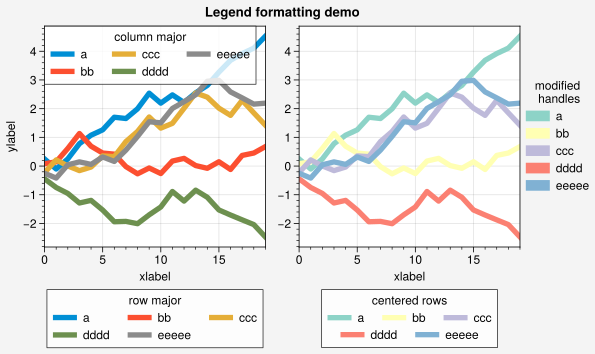
You can also draw legends with centered rows by passing center=True or by passing
a list of lists of plot handles to legend. This is accomplished by stacking
multiple single-row, horizontally centered legends, then adding an encompassing
legend frame. To switch between row-major and column-major order for legend
entries, simply use the order keyword (the default is order='C'). To modify
the legend handles (in particular for plot and
scatter plots), simply pass the relevant properties
like color, linewidth, or markersize to legend. To alphabetize the
legend entries, you can simply use alphabetize=True. See the
legend documentation for details.
[6]:
import proplot as pplt
import numpy as np
pplt.rc.cycle = '538'
fig, axs = pplt.subplots(ncols=2, span=False, share='labels', refwidth=2.3)
labels = ['a', 'bb', 'ccc', 'dddd', 'eeeee']
hs1, hs2 = [], []

# On-the-fly legends
state = np.random.RandomState(51423)
for i, label in enumerate(labels):
    data = (state.rand(20) - 0.45).cumsum(axis=0)
    h1 = axs[0].plot(
        data, lw=4, label=label, legend='ul',
        legend_kw={'order': 'F', 'title': 'column major'}
    )
    hs1.extend(h1)
    h2 = axs[1].plot(
        data, lw=4, cycle='Set3', label=label, legend='r',
        legend_kw={'lw': 8, 'ncols': 1, 'frame': False, 'title': 'modified\n handles'}
    )
    hs2.extend(h2)

# Outer legends
ax = axs[0]
ax.legend(hs1, loc='b', ncols=3, title='row major', order='C', facecolor='gray2')
ax = axs[1]
ax.legend(hs2, loc='b', ncols=3, center=True, title='centered rows')
axs.format(xlabel='xlabel', ylabel='ylabel', suptitle='Legend formatting demo')