Cartesian plots
This section documents features used for modifying Cartesian x and y axes, including axis scales, tick locations, tick label formatting, and several twin and dual axes commands.
Tick locations
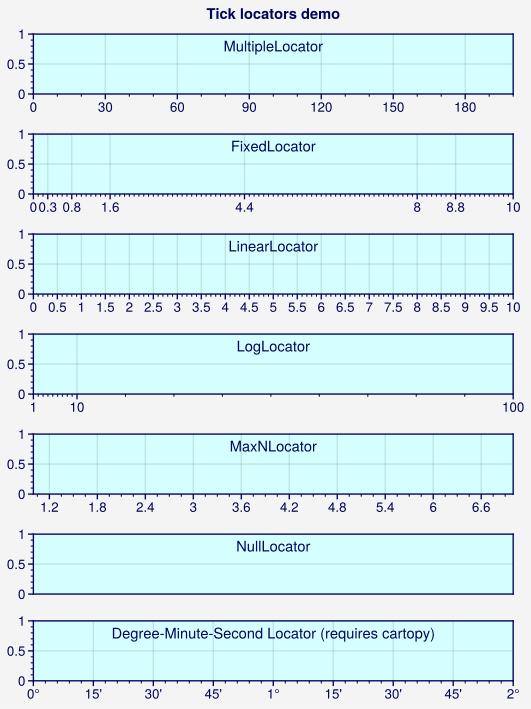
Matplotlib tick locators
select sensible tick locations based on the axis data limits. In ProPlot, you can
change the tick locator using the format keyword
arguments xlocator, ylocator, xminorlocator, and yminorlocator (or their
aliases, xticks, yticks, xminorticks, and yminorticks). This is powered by
the Locator constructor function.
You can use these keyword arguments to apply built-in matplotlib
Locators by their “registered” names
(e.g., xlocator='log'), to draw ticks every N data values with
MultipleLocator (e.g., xlocator=2), or to tick the
specific locations in a list using FixedLocator (just
like set_xticks and set_yticks).
If you want to work with the locator classes directly, they are available in the
top-level namespace (e.g., xlocator=pplt.MultipleLocator(...) is allowed).
To generate lists of tick locations, we recommend using ProPlot’s
arange function – it’s basically an endpoint-inclusive
version of numpy.arange, which is usually what you’ll want in this context.
[1]:
import proplot as pplt
import numpy as np
state = np.random.RandomState(51423)
pplt.rc.update(
    metawidth=1, fontsize=10,
    metacolor='dark blue', suptitlecolor='dark blue',
    titleloc='upper center', titlecolor='dark blue', titleborder=False,
    axesfacecolor=pplt.scale_luminance('powderblue', 1.15),
)
fig = pplt.figure(share=False, refwidth=5, refaspect=(8, 1))
fig.format(suptitle='Tick locators demo')

# Step size for tick locations
ax = fig.subplot(711)
ax.format(
    xlim=(0, 200), xminorlocator=10, xlocator=30,
    title='MultipleLocator'
)

# Specific list of locations
ax = fig.subplot(712)
ax.format(
    xlim=(0, 10), xminorlocator=0.1,
    xlocator=[0, 0.3, 0.8, 1.6, 4.4, 8, 8.8, 10],
    title='FixedLocator',
)

# Ticks at numpy.linspace(xmin, xmax, N)
ax = fig.subplot(713)
ax.format(
    xlim=(0, 10), xlocator=('linear', 21),
    title='LinearLocator',
)

# Logarithmic locator, used automatically for log scale plots
ax = fig.subplot(714)
ax.format(
    xlim=(1, 100), xlocator='log', xminorlocator='logminor',
    title='LogLocator',
)

# Maximum number of ticks, but at "nice" locations
ax = fig.subplot(715)
ax.format(
    xlim=(1, 7), xlocator=('maxn', 11),
    title='MaxNLocator',
)

# Hide all ticks
ax = fig.subplot(716)
ax.format(
    xlim=(-10, 10), xlocator='null',
    title='NullLocator',
)

# Tick locations that cleanly divide 60 minute/60 second intervals
ax = fig.subplot(717)
ax.format(
    xlim=(0, 2), xlocator='dms', xformatter='dms',
    title='Degree-Minute-Second Locator (requires cartopy)',
)

pplt.rc.reset()
Tick formatting
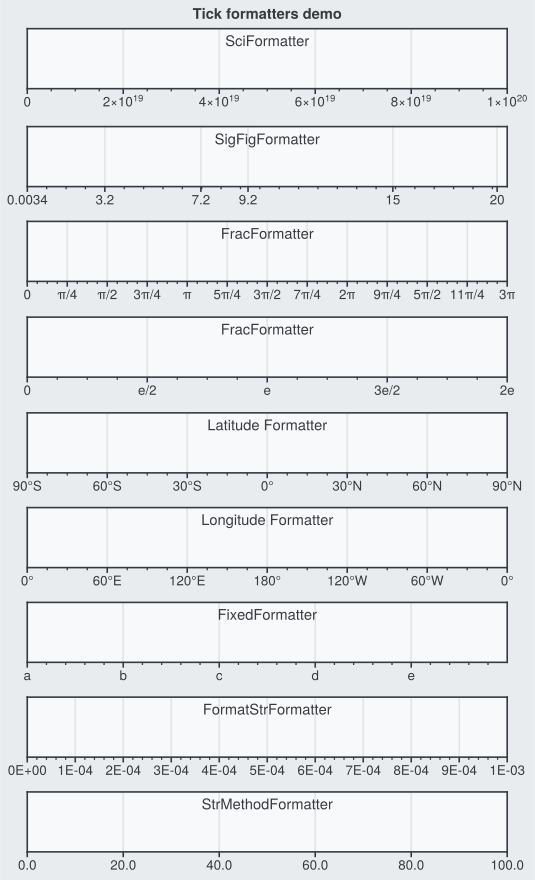
Matplotlib tick formatters
convert floating point numbers to nicely-formatted tick labels. In ProPlot, you can
change the tick formatter using the format keyword
arguments xformatter and yformatter (or their aliases, xticklabels and
yticklabels). This is powered by the Formatter
constructor function.
You can use these keyword arguments to apply built-in matplotlib
Formatters by their “registered” names
(e.g., xformatter='log'), to apply a %-style format directive with
FormatStrFormatter (e.g., xformatter='%.0f'), or
to apply custom tick labels with FixedFormatter (just
like set_xticklabels). You can also apply one of ProPlot’s
new tick formatters – for example, xformatter='deglat' to label ticks
as geographic latitude coordinates, xformatter='pi' to label ticks as
fractions of \(\pi\), or xformatter='sci' to label ticks with
scientific notation. If you want to work with the formatter classes
directly, they are available in the top-level namespace
(e.g., xformatter=pplt.SciFormatter(...) is allowed).
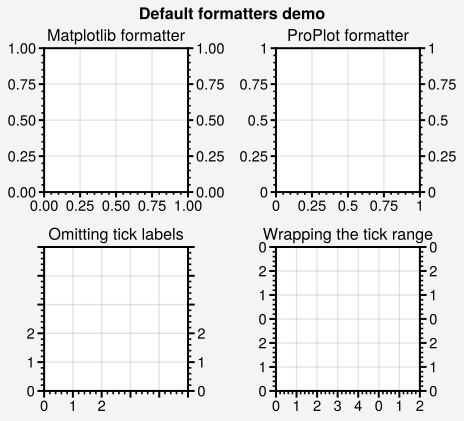
ProPlot also changes the default tick formatter to
AutoFormatter. This class trims trailing zeros by
default, can optionally omit or wrap tick values within particular
number ranges, and can add prefixes and suffixes to each label. See
AutoFormatter for details. To disable the trailing
zero-trimming feature, set rc['formatter.zerotrim'] to False.
[2]:
import proplot as pplt
pplt.rc.fontsize = 11
pplt.rc.metawidth = 1.5
pplt.rc.gridwidth = 1

# Create the figure
fig, axs = pplt.subplots(ncols=2, nrows=2, refwidth=1.5, share=False)
axs.format(
    ytickloc='both', yticklabelloc='both',
    titlepad='0.5em', suptitle='Default formatters demo'
)

# Formatter comparison
locator = [0, 0.25, 0.5, 0.75, 1]
axs[0].format(xformatter='scalar', yformatter='scalar', title='Matplotlib formatter')
axs[1].format(title='ProPlot formatter')
axs[:2].format(xlocator=locator, ylocator=locator)

# Limiting the tick range
axs[2].format(
    title='Omitting tick labels', ticklen=5, xlim=(0, 5), ylim=(0, 5),
    xtickrange=(0, 2), ytickrange=(0, 2), xlocator=1, ylocator=1
)

# Setting the wrap range
axs[3].format(
    title='Wrapping the tick range', ticklen=5, xlim=(0, 7), ylim=(0, 6),
    xwraprange=(0, 5), ywraprange=(0, 3), xlocator=1, ylocator=1
)
pplt.rc.reset()
[3]:
import proplot as pplt
import numpy as np
pplt.rc.update(
    metawidth=1.2, fontsize=10, axesfacecolor='gray0', figurefacecolor='gray2',
    metacolor='gray8', gridcolor='gray8', titlecolor='gray8', suptitlecolor='gray8',
    titleloc='upper center', titleborder=False,
)
fig = pplt.figure(refwidth=5, refaspect=(8, 1), share=False)

# Scientific notation
ax = fig.subplot(911)
ax.format(xlim=(0, 1e20), xformatter='sci', title='SciFormatter')

# N significant figures for ticks at specific values
ax = fig.subplot(912)
ax.format(
    xlim=(0, 20), xlocator=(0.0034, 3.233, 9.2, 15.2344, 7.2343, 19.58),
    xformatter=('sigfig', 2), title='SigFigFormatter',  # 2 significant digits
)

# Fraction formatters
ax = fig.subplot(913)
ax.format(
    xlim=(0, 3 * np.pi), xlocator=np.pi / 4, xformatter='pi', title='FracFormatter',
)
ax = fig.subplot(914)
ax.format(
    xlim=(0, 2 * np.e), xlocator=np.e / 2, xticklabels='e', title='FracFormatter',
)

# Geographic formatters
ax = fig.subplot(915)
ax.format(
    xlim=(-90, 90), xlocator=30, xformatter='deglat', title='Latitude Formatter'
)
ax = fig.subplot(916)
ax.format(
    xlim=(0, 360), xlocator=60, xformatter='deglon', title='Longitude Formatter'
)

# User input labels
ax = fig.subplot(917)
ax.format(
    xlim=(0, 5), xlocator=np.arange(5),
    xticklabels=['a', 'b', 'c', 'd', 'e'], title='FixedFormatter',
)

# Custom style labels
ax = fig.subplot(918)
ax.format(
    xlim=(0, 0.001), xlocator=0.0001, xformatter='%.E', title='FormatStrFormatter',
)
ax = fig.subplot(919)
ax.format(
    xlim=(0, 100), xtickminor=False, xlocator=20,
    xformatter='{x:.1f}', title='StrMethodFormatter',
)
fig.format(ylocator='null', suptitle='Tick formatters demo')
pplt.rc.reset()
Datetime axes
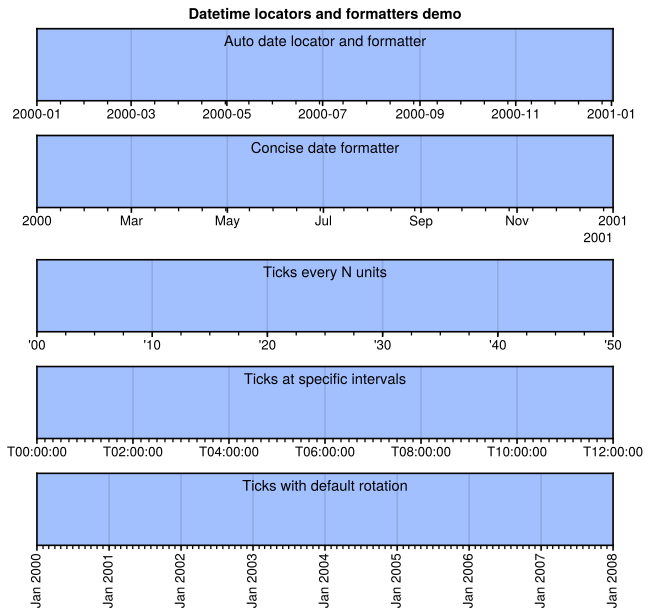
ProPlot can also be used to customize the tick locations and tick label
format of “datetime” axes. To draw ticks on some particular time unit, just use a
unit string (e.g., xlocator='month'). To draw ticks every N time units,
just use a (unit, N) tuple (e.g., xlocator=('day', 5)). For % style formatting
of datetime tick labels, just use a string containing '%' (e.g.
xformatter='%Y-%m-%d'). By default, x axis datetime axis labels are
rotated 90 degrees, like in pandas. This can be disabled by passing
xrotation=0 to format or by setting
rc['formatter.timerotation'] to 0. See Locator
and Formatter for details.
[4]:
import proplot as pplt
import numpy as np
pplt.rc.update(
    metawidth=1.2, fontsize=10, ticklenratio=0.7,
    figurefacecolor='w', axesfacecolor='pastel blue',
    titleloc='upper center', titleborder=False,
)
fig, axs = pplt.subplots(nrows=5, refwidth=6, refaspect=(8, 1), share=False)

# Default date locator
# This is enabled if you plot datetime data or set datetime limits
ax = axs[0]
ax.format(
    xlim=(np.datetime64('2000-01-01'), np.datetime64('2001-01-02')),
    title='Auto date locator and formatter'
)

# Concise date formatter introduced in matplotlib 3.1
ax = axs[1]
ax.format(
    xlim=(np.datetime64('2000-01-01'), np.datetime64('2001-01-01')),
    xformatter='concise', title='Concise date formatter',
)

# Minor ticks every year, major every 10 years
ax = axs[2]
ax.format(
    xlim=(np.datetime64('2000-01-01'), np.datetime64('2050-01-01')),
    xlocator=('year', 10), xformatter='\'%y', title='Ticks every N units',
)

# Minor ticks every 10 minutes, major every 2 minutes
ax = axs[3]
ax.format(
    xlim=(np.datetime64('2000-01-01T00:00:00'), np.datetime64('2000-01-01T12:00:00')),
    xlocator=('hour', range(0, 24, 2)), xminorlocator=('minute', range(0, 60, 10)),
    xformatter='T%H:%M:%S', title='Ticks at specific intervals',
)

# Month and year labels, with default tick label rotation
ax = axs[4]
ax.format(
    xlim=(np.datetime64('2000-01-01'), np.datetime64('2008-01-01')),
    xlocator='year', xminorlocator='month',  # minor ticks every month
    xformatter='%b %Y', title='Ticks with default rotation',
)
axs[:4].format(xrotation=0)  # no rotation for the first four examples
fig.format(ylocator='null', suptitle='Datetime locators and formatters demo')
pplt.rc.reset()
Axis scales
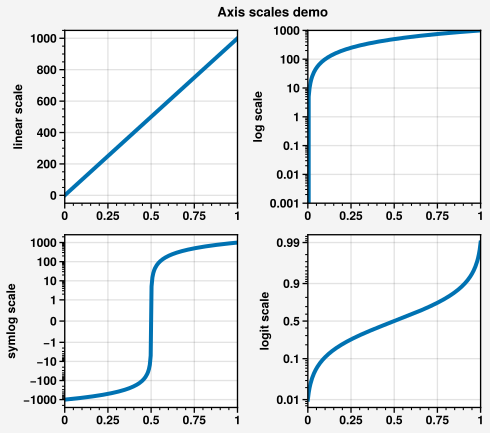
“Axis scales” like 'linear' and 'log' control the x and y axis
coordinate system. To change the axis scale, pass e.g. xscale='log' or
yscale='log' to format. This is powered by the
Scale constructor function.
ProPlot makes several changes to the axis scale API:
The
AutoFormatterformatter is now used for all axis scales by default, including'log'and'symlog'. Matplotlib’s behavior can be restored by passing e.g.xformatter='log'oryformatter='log'toformat.To make its behavior consistent with
LocatorandFormatter, theScaleconstructor function returns instances ofScaleBase, andset_xscaleandset_yscalenow accept these class instances in addition to “registered” names like'log'.While matplotlib axis scales must be instantiated with an
Axisinstance (for backwards compatibility reasons), ProPlot axis scales can be instantiated without the axis instance (e.g.,pplt.LogScale()instead ofpplt.LogScale(ax.xaxis)).The default
subsfor the'symlog'axis scale is nownp.arange(1, 10), and the defaultlinthreshis now1. Also the'log'and'symlog'axis scales now accept the keywordsbase,linthresh,linscale, andsubsrather than keywords with trailingxory.
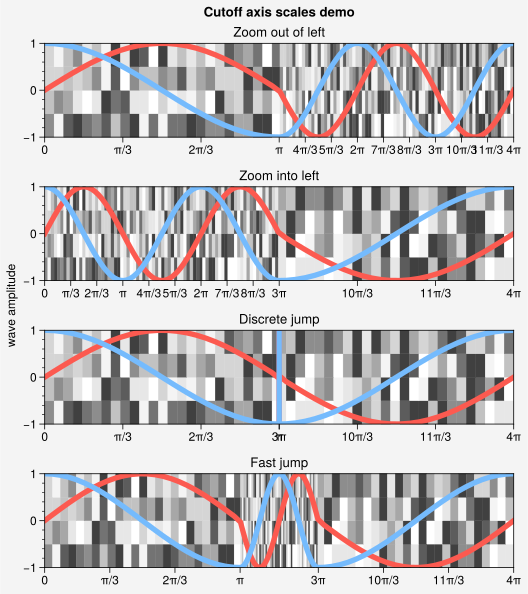
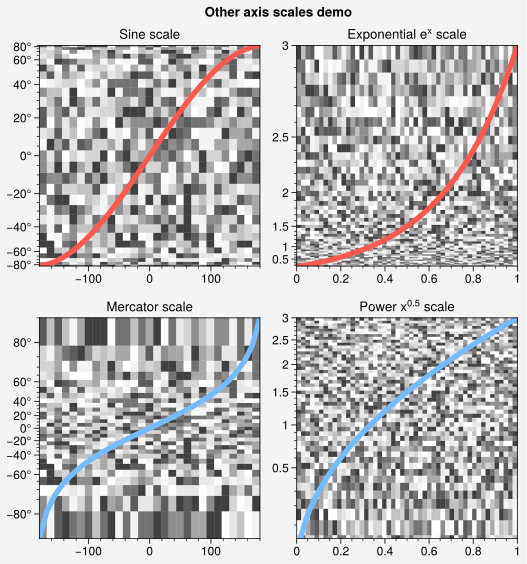
ProPlot also includes a few new axis scales. The 'cutoff' scale (see
CutoffScale) is useful when the statistical distribution
of your data is very unusual. The 'sine' scale SineLatitudeScale
scales the axis with a sine function (resulting in an area-weighted spherical latitude
coordinate) and the 'mercator' scale MercatorLatitudeScale
scales the axis with the Mercator projection latitude coordinate. The
'inverse' scale InverseScale can be useful when
working with spectral data, especially with “dual” unit axes.
If you want to work with the axis scale classes directly, they are available
in the top-level namespace (e.g., xscale=pplt.CutoffScale(...) is allowed).
[5]:
import proplot as pplt
import numpy as np
N = 200
lw = 3
pplt.rc.update({'meta.width': 1, 'label.weight': 'bold', 'tick.labelweight': 'bold'})
fig = pplt.figure(refwidth=1.8, share=False)

# Linear and log scales
ax1 = fig.subplot(221)
ax1.format(yscale='linear', ylabel='linear scale')
ax2 = fig.subplot(222)
ax2.format(ylim=(1e-3, 1e3), yscale='log', ylabel='log scale')
for ax in (ax1, ax2):
    ax.plot(np.linspace(0, 1, N), np.linspace(0, 1000, N), lw=lw)

# Symlog scale
ax = fig.subplot(223)
ax.format(yscale='symlog', ylabel='symlog scale')
ax.plot(np.linspace(0, 1, N), np.linspace(-1000, 1000, N), lw=lw)

# Logit scale
ax = fig.subplot(224)
ax.format(yscale='logit', ylabel='logit scale')
ax.plot(np.linspace(0, 1, N), np.linspace(0.01, 0.99, N), lw=lw)

fig.format(suptitle='Axis scales demo', ytickminor=True)
pplt.rc.reset()
[6]:
import proplot as pplt
import numpy as np

# Create figure
x = np.linspace(0, 4 * np.pi, 100)
dy = np.linspace(-1, 1, 5)
ys = (np.sin(x), np.cos(x))
state = np.random.RandomState(51423)
data = state.rand(len(dy) - 1, len(x) - 1)
colors = ('coral', 'sky blue')
cmap = pplt.Colormap('grays', right=0.8)
fig, axs = pplt.subplots(nrows=4, refaspect=(5, 1), figwidth=5.5, sharex=False)

# Loop through various cutoff scale options
titles = ('Zoom out of left', 'Zoom into left', 'Discrete jump', 'Fast jump')
args = (
    (np.pi, 3),  # speed up
    (3 * np.pi, 1 / 3),  # slow down
    (np.pi, np.inf, 3 * np.pi),  # discrete jump
    (np.pi, 5, 3 * np.pi)  # fast jump
)
locators = (
    np.pi / 3,
    np.pi / 3,
    np.pi * np.append(np.linspace(0, 1, 4), np.linspace(3, 4, 4)),
    np.pi * np.append(np.linspace(0, 1, 4), np.linspace(3, 4, 4)),
)
for ax, iargs, title, locator in zip(axs, args, titles, locators):
    ax.pcolormesh(x, dy, data, cmap=cmap)
    for y, color in zip(ys, colors):
        ax.plot(x, y, lw=4, color=color)
    ax.format(
        xscale=('cutoff', *iargs), xlim=(0, 4 * np.pi),
        xlocator=locator, xformatter='pi', xtickminor=False,
        ygrid=False, ylabel='wave amplitude',
        title=title, suptitle='Cutoff axis scales demo'
    )
[7]:
import proplot as pplt
import numpy as np

# Create figure
n = 30
state = np.random.RandomState(51423)
data = state.rand(n - 1, n - 1)
colors = ('coral', 'sky blue')
cmap = pplt.Colormap('grays', right=0.8)
gs = pplt.GridSpec(nrows=2, ncols=2)
fig = pplt.figure(refwidth=2.3, share=False)
fig.format(grid=False, suptitle='Other axis scales demo')

# Geographic scales
x = np.linspace(-180, 180, n)
y = np.linspace(-85, 85, n)
for i, scale in enumerate(('sine', 'mercator')):
    ax = fig.subplot(gs[i, 0])
    ax.plot(x, y, '-', color=colors[i], lw=4)
    ax.pcolormesh(x, y, data, cmap='grays', cmap_kw={'right': 0.8})
    ax.format(
        yscale=scale, title=scale.title() + ' scale',
        ylim=(-85, 85), ylocator=20, yformatter='deg',
    )

# Exponential scale
n = 50
x = np.linspace(0, 1, n)
y = 3 * np.linspace(0, 1, n)
data = state.rand(len(y) - 1, len(x) - 1)
ax = fig.subplot(gs[0, 1])
title = 'Exponential $e^x$ scale'
ax.pcolormesh(x, y, data, cmap='grays', cmap_kw={'right': 0.8})
ax.plot(x, y, lw=4, color=colors[0])
ax.format(ymin=0.05, yscale=('exp', np.e), title=title)

# Power scale
ax = fig.subplot(gs[1, 1])
title = 'Power $x^{0.5}$ scale'
ax.pcolormesh(x, y, data, cmap='grays', cmap_kw={'right': 0.8})
ax.plot(x, y, lw=4, color=colors[1])
ax.format(ymin=0.05, yscale=('power', 0.5), title=title)
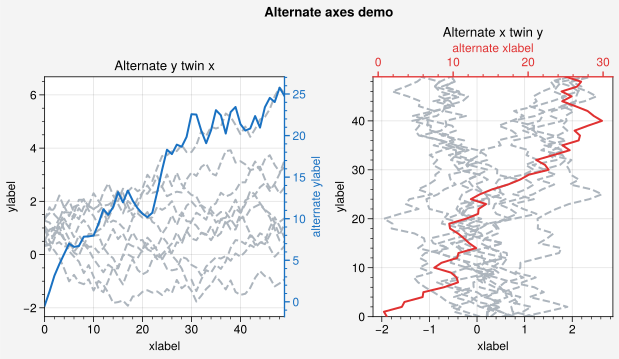
Alternate axes
The matplotlib.axes.Axes class includes twinx
and twiny commands for drawing “twin” x and
y axes in the same subplot. ProPlot expands on these commands and adds
the arguably more intuitive altx and
alty options. Here altx
is equivalent to twiny (makes an alternate x
axes and an identical twin y axes) and alty
is equivalent to twinx (makes an alternate y
axes and an identical twin x axes). The ProPlot versions can be quickly
formatted by passing proplot.axes.CartesianAxes.format keyword arguments
to the commands (e.g., ax.alty(ycolor='red') or, since the y prefix in
this context is redundant, just ax.alty(color='red')). They also enforce
sensible default locations for the spines, ticks, and labels, and disable
the twin axes background patch and gridlines by default.
[8]:
import proplot as pplt
import numpy as np
state = np.random.RandomState(51423)
c0 = 'gray5'
c1 = 'red8'
c2 = 'blue8'
N, M = 50, 10

# Alternate y axis
data = state.rand(M) + (state.rand(N, M) - 0.48).cumsum(axis=0)
altdata = 5 * (state.rand(N) - 0.45).cumsum(axis=0)
fig = pplt.figure(share=False)
ax = fig.subplot(121)
ax.format(title='Alternate y twin x')
ax.line(data, color=c0, ls='--')
ox = ax.alty(color=c2, label='alternate ylabel', linewidth=1)
ox.line(altdata, color=c2)

# Alternate x axis
data = state.rand(M) + (state.rand(N, M) - 0.48).cumsum(axis=0)
altdata = 5 * (state.rand(N) - 0.45).cumsum(axis=0)
ax = fig.subplot(122)
ax.format(title='Alternate x twin y')
ax.linex(data, color=c0, ls='--')
ox = ax.altx(color=c1, label='alternate xlabel', linewidth=1)
ox.linex(altdata, color=c1)
fig.format(xlabel='xlabel', ylabel='ylabel', suptitle='Alternate axes demo')
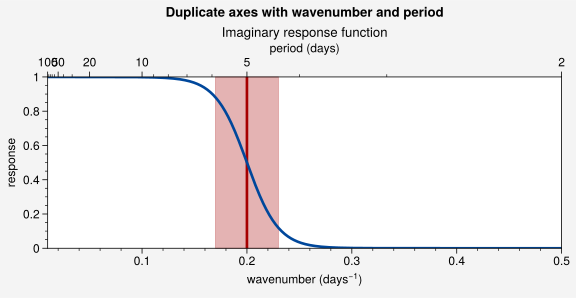
Dual unit axes
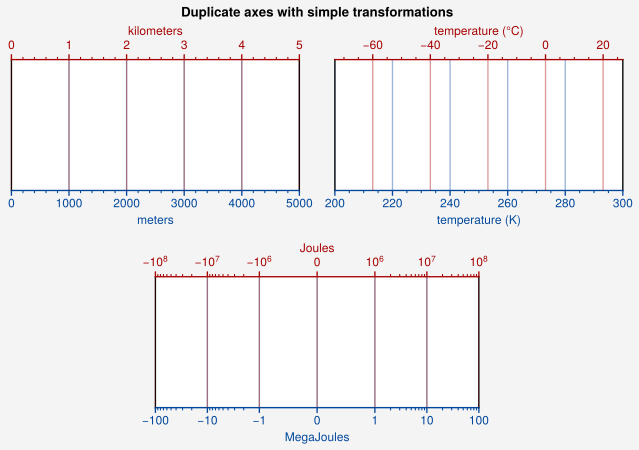
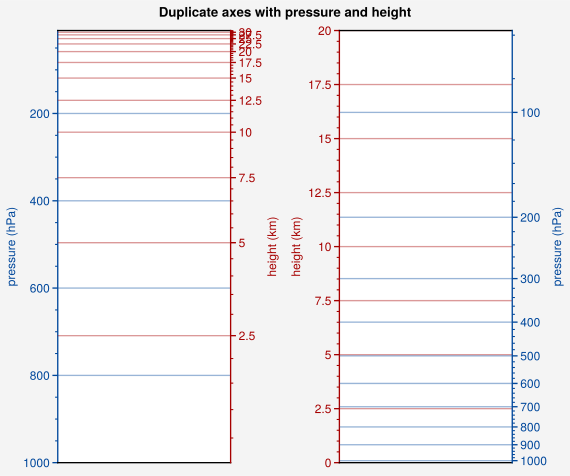
The dualx and
dualy methods can be used to draw duplicate x and
y axes meant to represent alternate units in the same coordinate range as the
“parent” axis. This feature is powered by the FuncScale class.
dualx and dualy accept
the same axis formatting keyword arguments as altx
and alty. The alternate units are specified with
either of the following three positional arguments:
A single linear forward function.
A 2-tuple of arbitrary forward and inverse functions.
An axis scale name or class instance.
In the third case, the axis scale transforms are used for the forward and
inverse functions, and the default axis scale locators and formatters are used
for the default dual axis locators and formatters. In the below examples,
we generate dual axes with each of these three methods. Note that the
“parent” axis scale is arbitrary – in the first example, we create
a dualx axis for a symlog-scaled axis.
[9]:
import proplot as pplt
pplt.rc.update({'grid.alpha': 0.4, 'meta.width': 1, 'grid.linewidth': 1})
c1 = pplt.scale_luminance('cerulean', 0.5)
c2 = pplt.scale_luminance('red', 0.5)
fig = pplt.figure(refaspect=2.2, refwidth=3, share=False)
axs = fig.subplots([[1, 1, 2, 2], [0, 3, 3, 0]])
axs.format(
    suptitle='Duplicate axes with simple transformations',
    ylocator=[], yformatter=[], xcolor=c1, gridcolor=c1,
)

# Meters and kilometers
ax = axs[0]
ax.format(xlim=(0, 5000), xlabel='meters')
ax.dualx(
    lambda x: x * 1e-3,
    label='kilometers', grid=True, color=c2, gridcolor=c2
)

# Kelvin and Celsius
ax = axs[1]
ax.format(xlim=(200, 300), xlabel='temperature (K)')
ax.dualx(
    lambda x: x - 273.15,
    label='temperature (\N{DEGREE SIGN}C)', grid=True, color=c2, gridcolor=c2
)

# With symlog parent
ax = axs[2]
ax.format(xlim=(-100, 100), xscale='symlog', xlabel='MegaJoules')
ax.dualx(
    lambda x: x * 1e6,
    label='Joules', formatter='log', grid=True, color=c2, gridcolor=c2
)
pplt.rc.reset()
[10]:
import proplot as pplt
pplt.rc.update({'grid.alpha': 0.4, 'meta.width': 1, 'grid.linewidth': 1})
c1 = pplt.scale_luminance('cerulean', 0.5)
c2 = pplt.scale_luminance('red', 0.5)
fig = pplt.figure(share=False, refaspect=0.4, refwidth=1.8)
fig.format(suptitle='Duplicate axes with pressure and height')

# Pressure as the linear scale, height on opposite axis (scale height 7km)
ax = fig.subplot(121)
ax.format(
    xformatter='null', ylabel='pressure (hPa)',
    ylim=(1000, 10), xlocator=[], ycolor=c1, gridcolor=c1
)
ax.dualy(
    'height', label='height (km)', ticks=2.5, color=c2, gridcolor=c2, grid=True
)

# Height as the linear scale, pressure on opposite axis (scale height 7km)
ax = fig.subplot(122)
ax.format(
    xformatter='null', ylabel='height (km)', ylim=(0, 20), xlocator='null',
    grid=True, gridcolor=c2, ycolor=c2
)
ax.dualy(
    'pressure', label='pressure (hPa)', locator=100, color=c1, gridcolor=c1, grid=True,
)
pplt.rc.reset()
[11]:
import proplot as pplt
import numpy as np
pplt.rc.margin = 0
c1 = pplt.scale_luminance('cerulean', 0.5)
c2 = pplt.scale_luminance('red', 0.5)
fig, ax = pplt.subplots(refaspect=(3, 1), figwidth=6)

# Sample data
cutoff = 1 / 5
x = np.linspace(0.01, 0.5, 1000)  # in wavenumber days
response = (np.tanh(-((x - cutoff) / 0.03)) + 1) / 2  # response func
ax.axvline(cutoff, lw=2, ls='-', color=c2)
ax.fill_between([cutoff - 0.03, cutoff + 0.03], 0, 1, color=c2, alpha=0.3)
ax.plot(x, response, color=c1, lw=2)

# Add inverse scale to top
ax.format(
    title='Imaginary response function',
    suptitle='Duplicate axes with wavenumber and period',
    xlabel='wavenumber (days$^{-1}$)', ylabel='response', grid=False,
)
ax = ax.dualx(
    'inverse', locator='log', locator_kw={'subs': (1, 2, 5)}, label='period (days)'
)
pplt.rc.reset()