Geographic and polar plots
ProPlot includes features for working with polar axes and the cartopy and basemap map projection packages. These features are optional; installation of cartopy and basemap are not required.
To change the axes projection, pass proj='name' to subplots. To use different projections for different subplots, pass a dictionary of projection names with the subplot number as the key – for example, proj={1:'name'}. The default “projection” is always XYAxes.
Polar projections
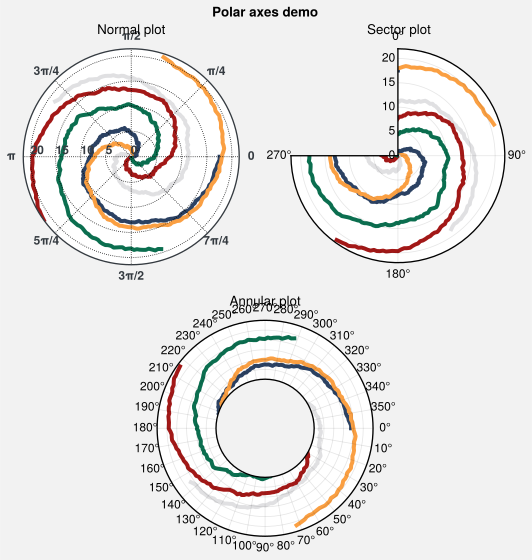
To draw polar axes, pass proj='polar' or e.g. proj={1:'polar'} to subplots. This generates a PolarAxes instance. Its format command permits polar-specific modifications like changing the central radius, the zero azimuth location, the radial and azimuthal limits, and the positive azimuthal direction. A demonstration is below.
[1]:
import proplot as plot
import numpy as np
state = np.random.RandomState(51423)
N = 200
x = np.linspace(0, 2*np.pi, N)
y = 100*(state.rand(N, 5)-0.3).cumsum(axis=0)/N
f, axs = plot.subplots([[1, 1, 2, 2], [0, 3, 3, 0]], proj='polar')
axs.format(
    suptitle='Polar axes demo', linewidth=1,
    ticklabelsize=9, rlines=0.5, rlim=(0, 19),
    titlepad='1.5em'  # matplotlib default title offset is incorrect
)
for i in range(5):
    axs.plot(x + i*2*np.pi/5, y[:, i], cycle='contrast', zorder=0, lw=3)

# Standard polar plot
axs[0].format(
    title='Normal plot', thetaformatter='pi', rlines=5, gridalpha=1, gridlinestyle=':',
    rlabelpos=180, color='gray8', ticklabelweight='bold'
)

# Sector plot
axs[1].format(
    title='Sector plot', thetadir=-1, thetalines=90, thetalim=(0, 270), theta0='N',
    rlim=(0, 22), rlines=5
)

# Annular plot
axs[2].format(
    title='Annular plot', thetadir=-1, thetalines=10,
    r0=0, rlim=(10, 22), rformatter='null', rlocator=2
)
/home/docs/checkouts/readthedocs.org/user_builds/proplot/conda/v0.4.1/lib/python3.7/site-packages/proplot/utils.py:103: ProPlotWarning: Rebuilding font manager.
findfont: Font family ['cursive'] not found. Falling back to DejaVu Sans.
Geographic projections
To specify a geographic projection, pass proj='name' or e.g. proj={1:'name'} to subplots where 'name' is any valid PROJ projection name listed in the Proj table. This generates a GeoAxes or BasemapAxes, depending on whether you passed basemap=True to subplots.
GeoAxesjoins the cartopyGeoAxesclass with the ProPlotAxesclass and adds aformatcommand. This class includes all the normalGeoAxesmethods, and itsformatmethod can be used to set the map bounds withset_extentand add geographic features withadd_feature.BasemapAxesredirects the plot, scatter, contour, contourf, pcolor, pcolormesh, quiver, streamplot, and barb methods to identically named methods on theBasemapinstance, and provides access toBasemapgeographic plotting commands likefillcontinentsvia theformatcommand.
So with ProPlot, you no longer have to invoke verbose cartopy Projection classes like LambertAzimuthalEqualArea, and you never have to directly reference the Basemap instance – ProPlot works with the Basemap instance under the hood.
To pass keyword args to Basemap and Projection, use the proj_kw dictionary. To make things a bit more consistent, ProPlot lets you supply native PROJ keyword names to the cartopy Projection classes, e.g. lon_0 instead of central_longitude. ProPlot also lets you instantiate Basemap projections with sensible defaults from the basemap_kwargs dictionary, rather than raising an error when certain projection arguments are omitted.
[2]:
import proplot as plot
plot.rc.coastlinewidth = plot.rc.linewidth = 0.8

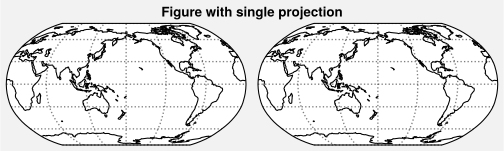
# Simple figure with just one projection
f, axs = plot.subplots(
    ncols=2, axwidth=2.5,
    proj='robin', proj_kw={'lon_0': 180}
)
axs.format(
    suptitle='Figure with single projection',
    coast=True, latlines=30, lonlines=60
)

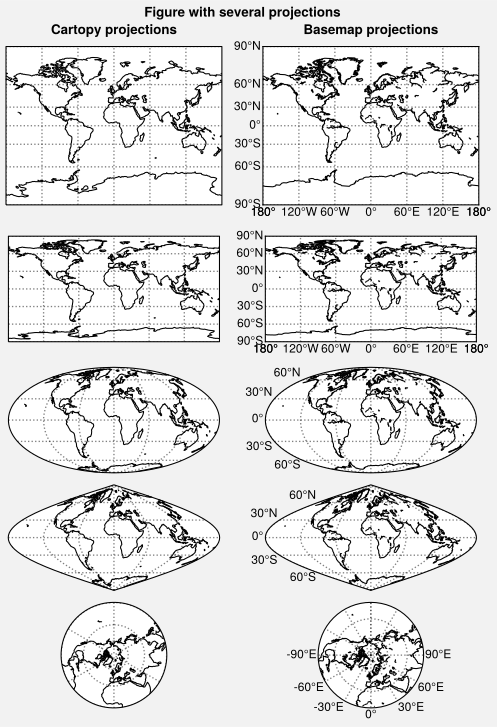
# Complex figure with different projections
f, axs = plot.subplots(
    hratios=(1.5, 1, 1, 1, 1),
    basemap={
        (1, 3, 5, 7, 9): False,
        (2, 4, 6, 8, 10): True
    },
    proj={
        (1, 2): 'mill',
        (3, 4): 'cyl',
        (5, 6): 'moll',
        (7, 8): 'sinu',
        (9, 10): 'npstere'
    },
    ncols=2, nrows=5
)
axs.format(suptitle='Figure with several projections')
axs.format(coast=True, latlines=30, lonlines=60)
axs[:, 1].format(labels=True, lonlines=plot.arange(-180, 179, 60))
axs[-1, -1].format(labels=True, lonlines=30)
axs.format(collabels=['Cartopy projections', 'Basemap projections'])
plot.rc.reset()
Warning: Cannot label meridians on Mollweide basemapWarning: Cannot label meridians on Sinusoidal basemap
/home/docs/checkouts/readthedocs.org/user_builds/proplot/conda/v0.4.1/lib/python3.7/site-packages/cartopy/io/__init__.py:260: DownloadWarning: Downloading: http://naciscdn.org/naturalearth/110m/physical/ne_110m_coastline.zip
  warnings.warn('Downloading: {}'.format(url), DownloadWarning)
Included projections
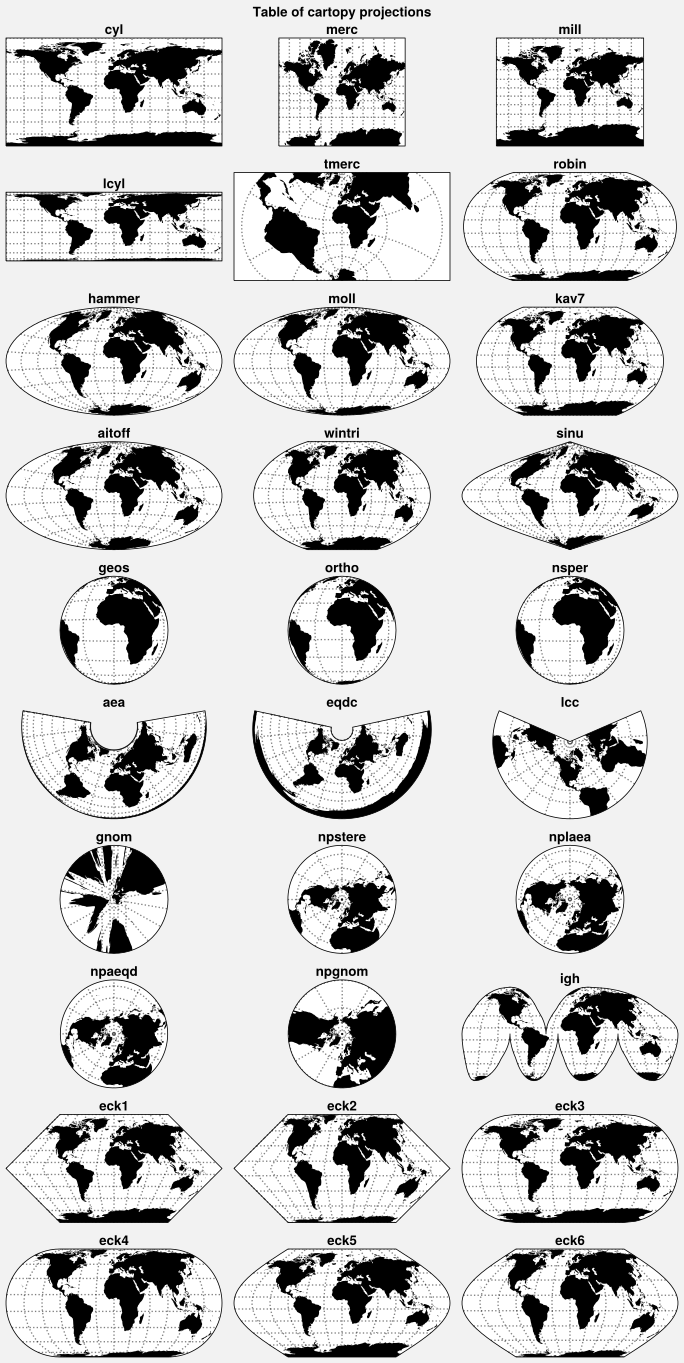
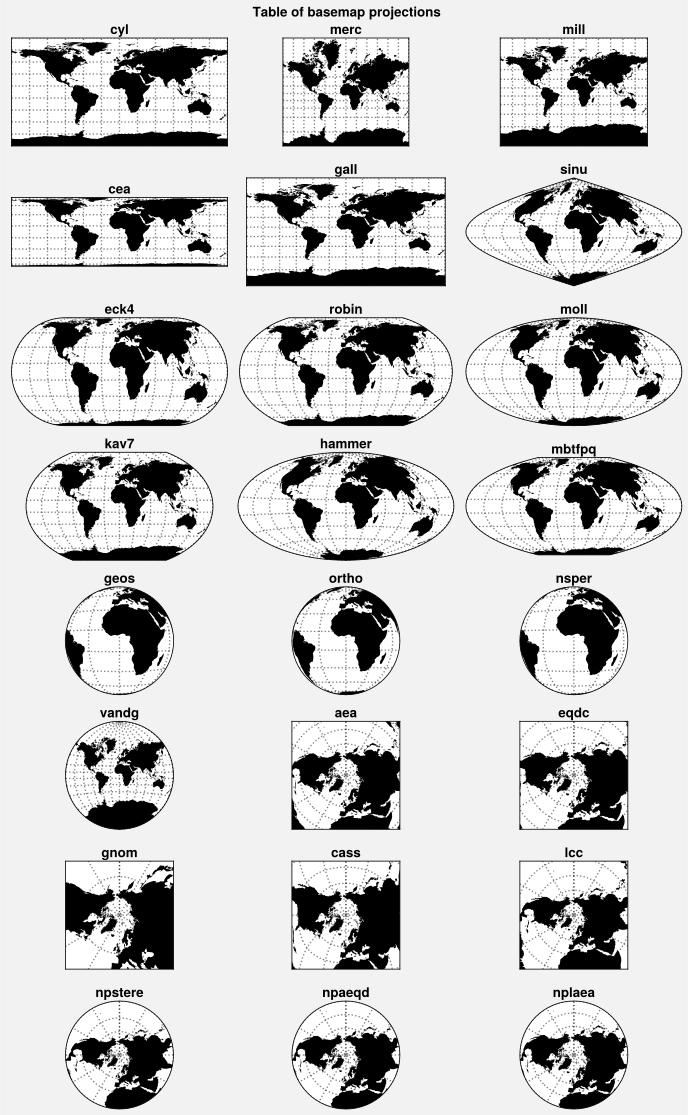
The available cartopy and basemap projections are plotted below. See Proj for a table of projection names with links to the relevant PROJ documentation.
ProPlot uses the cartopy API to add the Aitoff, Hammer, Winkel Tripel, and Kavrisky VII projections (i.e. 'aitoff', 'hammer', 'wintri', and 'kav7'), as well as North and South polar versions of the Azimuthal Equidistant, Lambert Azimuthal Equal-Area, and Gnomic projections (i.e. 'npaeqd', 'spaeqd', 'nplaea', 'splaea', 'npgnom', and 'spgnom'), modeled after the existing NorthPolarStereo and SouthPolarStereo projections.
Note that while cartopy projection bounds can be any shape, basemap projection bounds are usually rectangles. Basemap used to have many more projections than cartopy, but the ProPlot additions have evened things out.
[3]:
import proplot as plot
import numpy as np

# Table of cartopy projections
projs = [
    'cyl', 'merc', 'mill', 'lcyl', 'tmerc',
    'robin', 'hammer', 'moll', 'kav7', 'aitoff', 'wintri', 'sinu',
    'geos', 'ortho', 'nsper', 'aea', 'eqdc', 'lcc', 'gnom',
    'npstere', 'nplaea', 'npaeqd', 'npgnom', 'igh',
    'eck1', 'eck2', 'eck3', 'eck4', 'eck5', 'eck6'
]
f, axs = plot.subplots(ncols=3, nrows=10, proj=projs)
axs.format(
    land=True, reso='lo', labels=False,
    suptitle='Table of cartopy projections'
)
for proj, ax in zip(projs, axs):
    ax.format(title=proj, titleweight='bold', labels=False)

# Table of basemap projections
projs = [
    'cyl', 'merc', 'mill', 'cea', 'gall', 'sinu',
    'eck4', 'robin', 'moll', 'kav7', 'hammer', 'mbtfpq',
    'geos', 'ortho', 'nsper',
    'vandg', 'aea', 'eqdc', 'gnom', 'cass', 'lcc',
    'npstere', 'npaeqd', 'nplaea'
]
f, axs = plot.subplots(ncols=3, nrows=8, basemap=True, proj=projs)
axs.format(
    land=True, labels=False,
    suptitle='Table of basemap projections'
)
for proj, ax in zip(projs, axs):
    ax.format(title=proj, titleweight='bold', labels=False)
/home/docs/checkouts/readthedocs.org/user_builds/proplot/conda/v0.4.1/lib/python3.7/site-packages/cartopy/io/__init__.py:260: DownloadWarning: Downloading: http://naciscdn.org/naturalearth/110m/physical/ne_110m_land.zip
  warnings.warn('Downloading: {}'.format(url), DownloadWarning)
/home/docs/checkouts/readthedocs.org/user_builds/proplot/conda/v0.4.1/lib/python3.7/site-packages/cartopy/mpl/feature_artist.py:163: UserWarning: Unable to determine extent. Defaulting to global.
  warnings.warn('Unable to determine extent. Defaulting to global.')
Zooming into projections
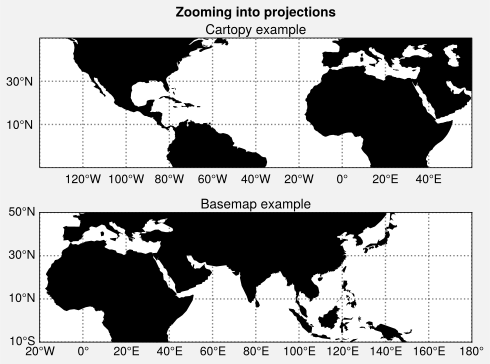
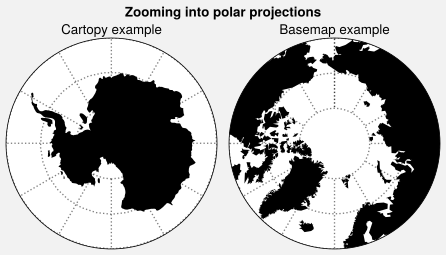
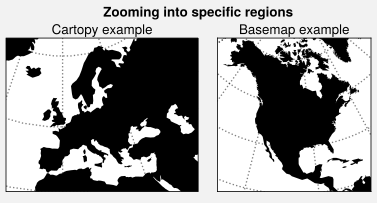
To zoom into cartopy projections, you can use set_extent, or alternatively pass lonlim, latlim, or boundinglat to format. The boundinglat controls the circular boundary extent for North Polar and South Polar Stereographic, Azimuthal Equidistant, Lambert Azimuthal Equal-Area, and Gnomonic projections (ProPlot makes sure these projections always have circular bounds).
To zoom into basemap projections, you must pass the limits to the Basemap class directly by passing proj_kw to subplots with any of the boundinglat, llcrnrlon, llcrnrlat, urcrnrlon, urcrnrlat, llcrnrx, llcrnry, urcrnrx, urcrnry, width, or height keyword args.
[4]:
import proplot as plot
f, axs = plot.subplots(
    nrows=2, axwidth=4.5,
    proj='pcarree', basemap={1: False, 2: True},
    proj_kw={2: {'llcrnrlon': -20, 'llcrnrlat': -10, 'urcrnrlon': 180, 'urcrnrlat': 50}}
)

# Ordinary projection
axs.format(
    land=True, labels=True, lonlines=20,
    latlines=20, suptitle='Zooming into projections'
)
axs[0].format(
    lonlim=(-140, 60), latlim=(-10, 50),
    labels=True, title='Cartopy example'
)
axs[1].format(title='Basemap example')

# Polar projection
f, axs = plot.subplots(
    ncols=2, axwidth=2.2,
    proj={1: 'splaea', 2: 'npaeqd'},
    basemap={1: False, 2: True},
    proj_kw={2: {'boundinglat': 60}}
)
axs.format(
    land=True, latlines=10, latmax=80,
    suptitle='Zooming into polar projections'
)
axs[0].format(boundinglat=-60, title='Cartopy example')
axs[1].format(title='Basemap example')

# Example from basemap website
f, axs = plot.subplots(
    ncols=2, axwidth=2, proj='lcc',
    basemap={1: False, 2: True},
    proj_kw={
        1: {'lon_0': 0},
        2: {'lon_0': -100, 'lat_0': 45, 'width': 8e6, 'height': 8e6}
    }
)
axs.format(suptitle='Zooming into specific regions', land=True)
axs[0].format(
    title='Cartopy example', land=True,
    lonlim=(-20, 50), latlim=(30, 70)
)
axs[1].format(title='Basemap example', land=True)
Plotting geophysical data
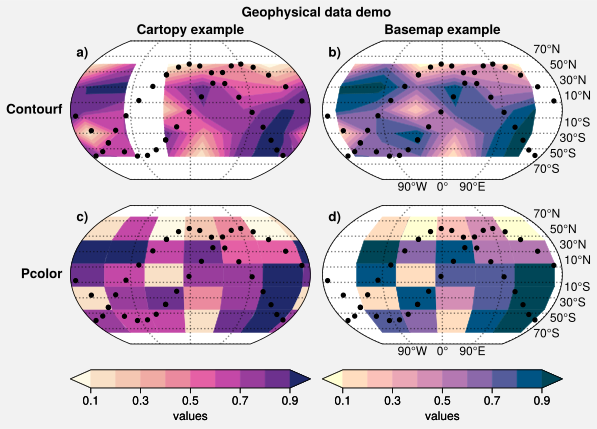
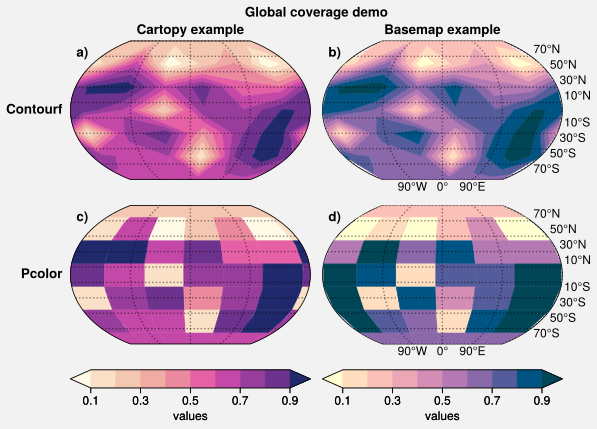
The below example demonstrates how to plot geophysical data with ProPlot. It is mostly the same as cartopy, but with some new features powered by the standardize_2d, default_transform, and default_latlon wrappers.
For both basemap and cartopy projections, you can pass
globe=Trueto 2D plotting commands to ensure global data coverage.For
GeoAxesplotting methods,transform=crs.PlateCarree()is now the default behavior. That is, ProPlot assumes your data is in longitude-latitude coordinates rather than map projection coordinates.For
BasemapAxesplotting methods,latlon=Trueis now the default behavior. Again, plotting methods are now called on the axes instead of theBasemapinstance.
[5]:
import proplot as plot
import numpy as np
offset = -40
x = plot.arange(offset, 360 + offset-1, 60)
y = plot.arange(-60, 60+1, 30)
state = np.random.RandomState(51423)
data = state.rand(len(y), len(x))

# Same figure with and without "global coverage"
titles = ('Geophysical data demo', 'Global coverage demo')
for globe in (False, True,):
    f, axs = plot.subplots(
        ncols=2, nrows=2, axwidth=2.5,
        proj='kav7', basemap={(1, 3): False, (2, 4): True})
    for i, ax in enumerate(axs):
        cmap = ('sunset', 'sunrise')[i % 2]
        if i < 2:
            m = ax.contourf(x, y, data, cmap=cmap, globe=globe, extend='both')
            f.colorbar(
                m, loc='b', span=i+1, label='values',
                tickminor=False, extendsize='1.7em'
            )
        else:
            ax.pcolor(x, y, data, cmap=cmap, globe=globe, extend='both')
        if globe:
            continue
        ix = offset + np.linspace(0, 360, 20)
        for cmd in (np.sin, np.cos):
            iy = cmd(ix*np.pi/180)*60
            ax.plot(ix, iy, color='k', lw=0, marker='o')
    axs.format(
        suptitle=titles[globe],
        collabels=['Cartopy example', 'Basemap example'],
        rowlabels=['Contourf', 'Pcolor'],
        latlabels='r', lonlabels='b', lonlines=90,
        abc=True, abcstyle='a)', abcloc='ul', abcborder=False
    )
/home/docs/checkouts/readthedocs.org/user_builds/proplot/conda/v0.4.1/lib/python3.7/site-packages/proplot/utils.py:103: ProPlotWarning: Cannot add gridline labels to cartopy KavrayskiyVII projection.
/home/docs/checkouts/readthedocs.org/user_builds/proplot/conda/v0.4.1/lib/python3.7/site-packages/proplot/utils.py:103: ProPlotWarning: Cannot add gridline labels to cartopy KavrayskiyVII projection.
Customizing projections
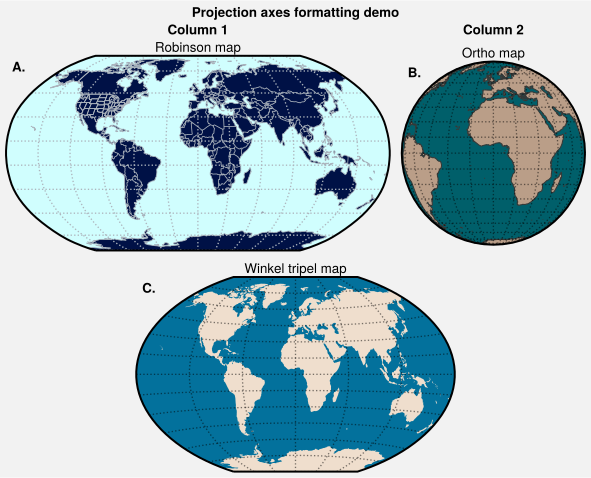
GeoAxes and BasemapAxes both derive from ProjAxes, which provides a format method. format can be used to draw gridlines, add gridline labels, set gridline label locations, modify the projection bounding box, and add and stylize geographic features, like land masses, coastlines, and international borders. This method also calls format on Axes, and so can be used for subplot titles, a-b-c labels, and figure titles as before.
[6]:
import proplot as plot
f, axs = plot.subplots(
    [[1, 1, 2], [3, 3, 3]],
    axwidth=4, proj={1: 'robin', 2: 'ortho', 3: 'wintri'}
)
axs.format(
    suptitle='Projection axes formatting demo',
    collabels=['Column 1', 'Column 2'],
    abc=True, abcstyle='A.', abcloc='ul', abcborder=False, linewidth=1.5
)

# Styling projections in different ways
ax = axs[0]
ax.format(
    title='Robinson map', land=True, landcolor='navy blue', facecolor='pale blue',
    coastcolor='gray5', borderscolor='gray5', innerborderscolor='gray5',
    geogridlinewidth=1, geogridcolor='gray5', geogridalpha=1,
    coast=True, innerborders=True, borders=True
)
ax = axs[1]
ax.format(
    title='Ortho map', reso='med', land=True, coast=True, latlines=10, lonlines=15,
    landcolor='mushroom', suptitle='Projection axes formatting demo',
    facecolor='petrol', coastcolor='charcoal', coastlinewidth=0.8, geogridlinewidth=1
)
ax = axs[2]
ax.format(
    land=True, facecolor='ocean blue', landcolor='almond', title='Winkel tripel map',
    lonlines=60, latlines=15
)
/home/docs/checkouts/readthedocs.org/user_builds/proplot/conda/v0.4.1/lib/python3.7/site-packages/cartopy/io/__init__.py:260: DownloadWarning: Downloading: http://naciscdn.org/naturalearth/110m/cultural/ne_110m_admin_0_boundary_lines_land.zip
  warnings.warn('Downloading: {}'.format(url), DownloadWarning)
/home/docs/checkouts/readthedocs.org/user_builds/proplot/conda/v0.4.1/lib/python3.7/site-packages/cartopy/io/__init__.py:260: DownloadWarning: Downloading: http://naciscdn.org/naturalearth/110m/cultural/ne_110m_admin_1_states_provinces_lakes.zip
  warnings.warn('Downloading: {}'.format(url), DownloadWarning)
/home/docs/checkouts/readthedocs.org/user_builds/proplot/conda/v0.4.1/lib/python3.7/site-packages/cartopy/io/__init__.py:260: DownloadWarning: Downloading: http://naciscdn.org/naturalearth/50m/physical/ne_50m_land.zip
  warnings.warn('Downloading: {}'.format(url), DownloadWarning)
/home/docs/checkouts/readthedocs.org/user_builds/proplot/conda/v0.4.1/lib/python3.7/site-packages/cartopy/io/__init__.py:260: DownloadWarning: Downloading: http://naciscdn.org/naturalearth/50m/physical/ne_50m_coastline.zip
  warnings.warn('Downloading: {}'.format(url), DownloadWarning)