Customizing figures
The format command
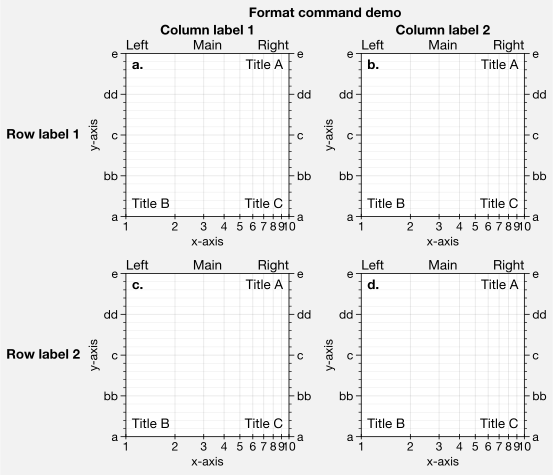
The Axes returned by subplots have a new format method. This is your one-stop-shop for changing axes settings. Keyword args passed to format are interpreted as follows.
Any keyword arg matching the name of an
rcsetting will be applied to the axes usingcontext. If the name has “dots”, simply omit them. See Configuring proplot for details.Remaining keyword args are passed to the class-specific
XYAxesformat,ProjAxesformat, orPolarAxesformatmethods.Still remaining keyword args are passed to the
Axesformatmethod.Axesis the base class for all other axes classes. This changes axes titles, a-b-c subplot labeling, and figure titles.
format allows you to use simple shorthands for changing all kinds of axes settings at once, instead of the verbose, one-liner setter methods like ax.set_title(), ax.set_xlabel(), and ax.xaxis.tick_params(). It is also integrated with the Locator, Formatter, and Scale constructors, so you don’t have to directly invoke verbose abstract classes. The goal here is to reduce the amount of boilerplate code needed for drawing highly customized plots.
[1]:
import proplot as plot
f, axs = plot.subplots(ncols=2, nrows=2, share=0, tight=True, axwidth=1.7)
axs.format(xlabel='x-axis', ylabel='y-axis', xlim=(1,10), xlocator=1, xscale='log',
          ylim=(0,4), ylocator=plot.arange(0,4), yticklabels=('a', 'bb', 'c', 'dd', 'e'),
          title='Main', ltitle='Left', rtitle='Right', # different titles
          titleloc='c', suptitle='Format command demo',
          abc=True, abcloc='ul', abcstyle='a.', xtickdir='inout',
          urtitle='Title A', lltitle='Title B', lrtitle='Title C', # extra titles
          ytickloc='both', yticklabelloc='both', ygridminor=True, xtickminor=False,
          collabels=['Column label 1', 'Column label 2'], rowlabels=['Row label 1', 'Row label 2'])
The rc configurator
A special object named rc is created whenever you import ProPlot. This is your one-stop shop for changing default settings. rc can be used to change matplotlib rcParams settings, custom ProPlot rcParamsLong settings, and special rcParamsShort meta-settings. See Configuring proplot for details.
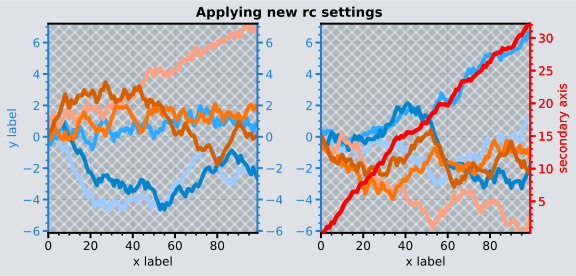
To modify a setting for just one subplot, pass it to the format command. To reset everything to the default state, use reset. To temporarily modify global settings for a block of code, use context.
[2]:
import proplot as plot
import numpy as np
# Update global settings in several different ways
plot.rc.cycle = 'colorblind'
plot.rc.update({'fontname': 'DejaVu Sans'})
plot.rc['figure.facecolor'] = 'gray3'
plot.rc['axes.facecolor'] = 'gray5'
# Context setting applied to figure only
with plot.rc.context(linewidth=1.5): # above mods are persistent, context mod only applies to figure
    f, axs = plot.subplots(ncols=2, aspect=1, width=6, span=False, sharey=2)
# Plot stuff
N, M = 100, 6
state = np.random.RandomState(51423)
values = np.arange(1,M+1)
cycle = plot.Cycle('C0', 'C1', M, fade=80) # cycle from two concatenated monochromatic colormaps
for i,ax in enumerate(axs):
    data = np.cumsum(state.rand(N,M)-0.5, axis=0)
    lines = ax.plot(data, linewidth=3, cycle=cycle)
axs.format(ytickloc='both', ycolor='blue7',
           xlabel='x label', ylabel='y label',
           yticklabelloc='both',
           suptitle='Applying new rc settings',
           patch_kw={'hatch':'xxx', 'edgecolor':'w'})
ay = axs[-1].twinx()
ay.format(ycolor='r', linewidth=1.5, ylabel='secondary axis')
ay.plot((state.rand(100)-0.2).cumsum(), color='r', lw=3)
plot.rc.reset() # reset persistent mods made at head of cell
Axis sharing and spanning
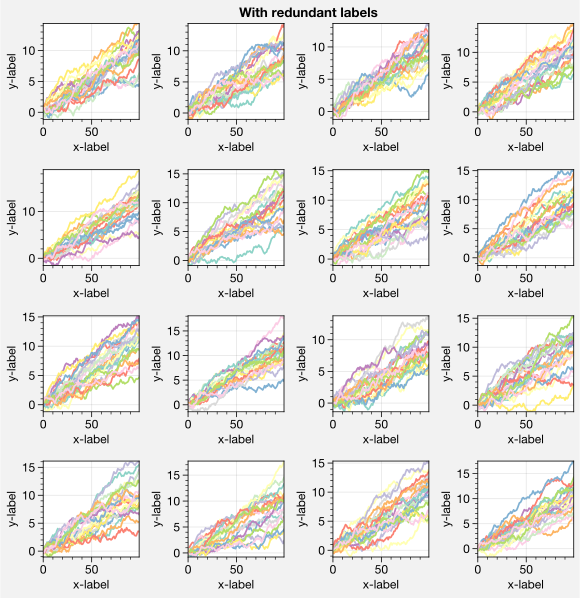
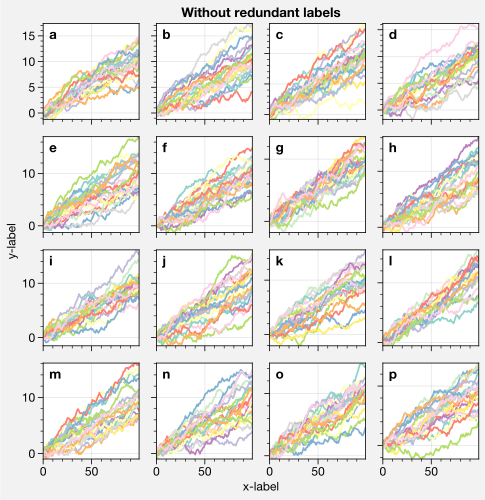
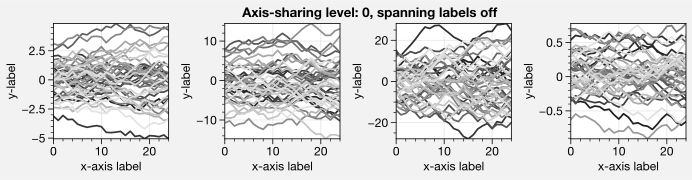
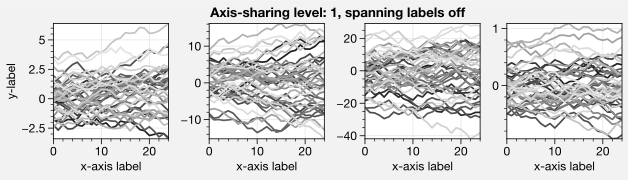
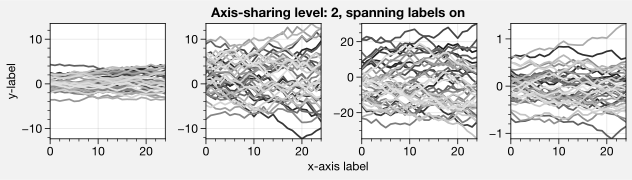
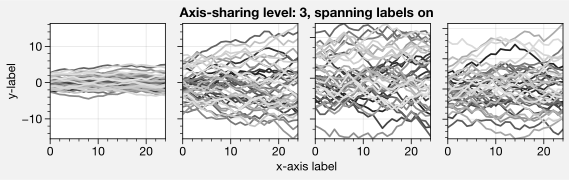
Matplotlib has an “axis sharing” feature that holds axis limits the same for axes within a grid of subplots. But this has no effect on the axis labels and tick labels, which can lead to lots of redundant labels.
To help you eliminate these redundancies, ProPlot introduces 4 axis-sharing options and a new spanning label option, controlled by the share, sharex, sharey, span, spanx, and spany keyword args. See subplots and the below example for details.
[3]:
import proplot as plot
import numpy as np
N = 50
M = 40
state = np.random.RandomState(51423)
colors = plot.colors('grays_r', M, left=0.1, right=0.8)
for share in (0,1,2,3):
    f, axs = plot.subplots(ncols=4, aspect=1, axwidth=1.2, sharey=share, spanx=share//2)
    gen = lambda scale: scale*(state.rand(N,M)-0.5).cumsum(axis=0)[N//2:,:]
    for ax,scale,color in zip(axs,(1,3,7,0.2),('gray9','gray7','gray5','gray3')):
        array = gen(scale)
        for l in range(array.shape[1]):
            ax.plot(array[:,l], color=colors[l])
        ax.format(suptitle=f'Axis-sharing level: {share}, spanning labels {["off","on"][share//2]}', ylabel='y-label', xlabel='x-axis label')
[4]:
import proplot as plot
import numpy as np
plot.rc.reset()
plot.rc.cycle = 'Set3'
state = np.random.RandomState(51423)
titles = ['With redundant labels', 'Without redundant labels']
for mode in (0,1):
    f, axs = plot.subplots(nrows=4, ncols=4, share=3*mode, span=1*mode, axwidth=1)
    for ax in axs:
        ax.plot((state.rand(100,20)-0.4).cumsum(axis=0))
    axs.format(xlabel='x-label', ylabel='y-label', suptitle=titles[mode], abc=mode, abcloc='ul')