Statistical plotting
This section documents a few very basic additions to matplotlib’s plotting commands that can be useful for statistical analysis. The 1D plotting section should be read before this section. Some of these tools will be expanded in the future, but for a more comprehensive suite of statistical plotting utilities, you may be interested in seaborn (we try to ensure that seaborn plotting commands are compatible with proplot figures and axes).
Error bars and shading
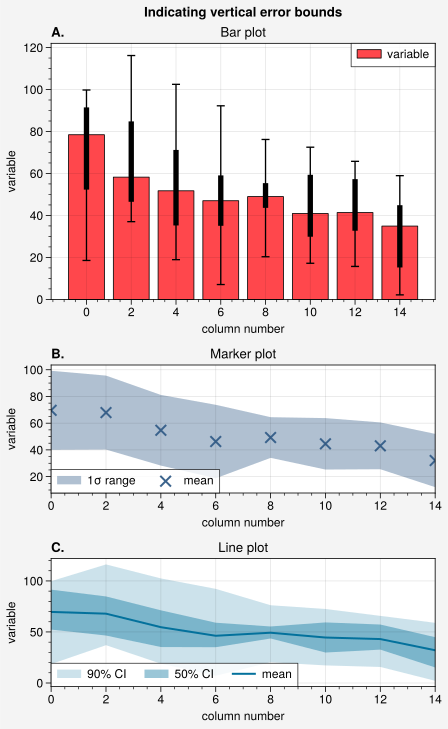
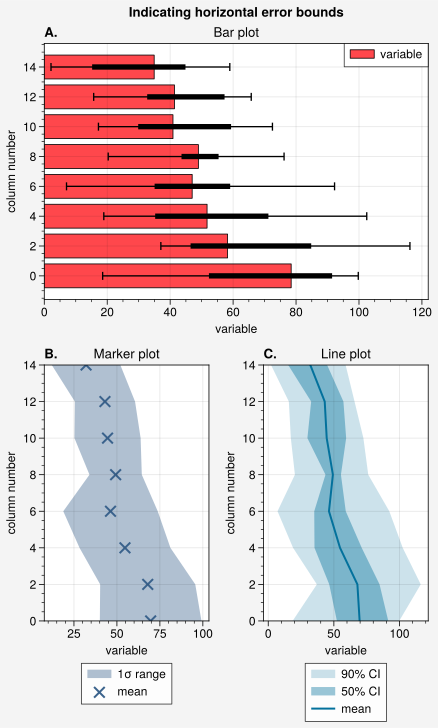
Error bars and error shading can be quickly added on-the-fly to
line, linex
(equivalently, plot,
plotx), scatter,
scatterx, bar, and
barh plots using any of several keyword arguments.
If you pass 2D arrays to these commands with mean=True, means=True,
median=True, or medians=True, the means or medians of each column are
drawn as lines, points, or bars, while error bars or error shading
indicates the spread of the distribution in each column. Invalid data is
ignored. You can also specify the error bounds manually with the bardata,
boxdata, shadedata, and fadedata keywords. These commands can draw and
style thin error bars (the bar keywords), thick “boxes” overlaid on top of
these bars (the box keywords; think of them as miniature boxplots), a
transparent primary shading region (the shade keywords), and a more
transparent secondary shading region (the fade keywords). See the documentation
on the plotting commands for details.
[1]:
import numpy as np
import pandas as pd

# Sample data
# Each column represents a distribution
state = np.random.RandomState(51423)
data = state.rand(20, 8).cumsum(axis=0).cumsum(axis=1)[:, ::-1]
data = data + 20 * state.normal(size=(20, 8)) + 30
data = pd.DataFrame(data, columns=np.arange(0, 16, 2))
data.columns.name = 'column number'
data.name = 'variable'

# Calculate error data
# Passed to 'errdata' in the 3rd subplot example
means = data.mean(axis=0)
means.name = data.name  # copy name for formatting
fadedata = np.percentile(data, (5, 95), axis=0)  # light shading
shadedata = np.percentile(data, (25, 75), axis=0)  # dark shading
[2]:
import proplot as pplt
import numpy as np

# Loop through "vertical" and "horizontal" versions
varray = [[1], [2], [3]]
harray = [[1, 1], [2, 3], [2, 3]]
for orientation, array in zip(('vertical', 'horizontal'), (varray, harray)):
    # Figure
    fig = pplt.figure(refwidth=4, refaspect=1.5, share=False)
    axs = fig.subplots(array, hratios=(2, 1, 1))
    axs.format(abc='A.', suptitle=f'Indicating {orientation} error bounds')

    # Medians and percentile ranges
    ax = axs[0]
    kw = dict(
        color='light red', edgecolor='k', legend=True,
        median=True, barpctile=90, boxpctile=True,
        # median=True, barpctile=(5, 95), boxpctile=(25, 75)  # equivalent
    )
    if orientation == 'horizontal':
        ax.barh(data, **kw)
    else:
        ax.bar(data, **kw)
    ax.format(title='Bar plot')

    # Means and standard deviation range
    ax = axs[1]
    kw = dict(
        color='denim', marker='x', markersize=8**2, linewidth=0.8,
        label='mean', shadelabel=True,
        mean=True, shadestd=1,
        # mean=True, shadestd=(-1, 1)  # equivalent
    )
    if orientation == 'horizontal':
        ax.scatterx(data, legend='b', legend_kw={'ncol': 1}, **kw)
    else:
        ax.scatter(data, legend='ll', **kw)
    ax.format(title='Marker plot')

    # User-defined error bars
    ax = axs[2]
    kw = dict(
        shadedata=shadedata, fadedata=fadedata,
        label='mean', shadelabel='50% CI', fadelabel='90% CI',
        color='ocean blue', barzorder=0, boxmarker=False,
    )
    if orientation == 'horizontal':
        ax.linex(means, legend='b', legend_kw={'ncol': 1}, **kw)
    else:
        ax.line(means, legend='ll', **kw)
    ax.format(title='Line plot')
Box plots and violin plots
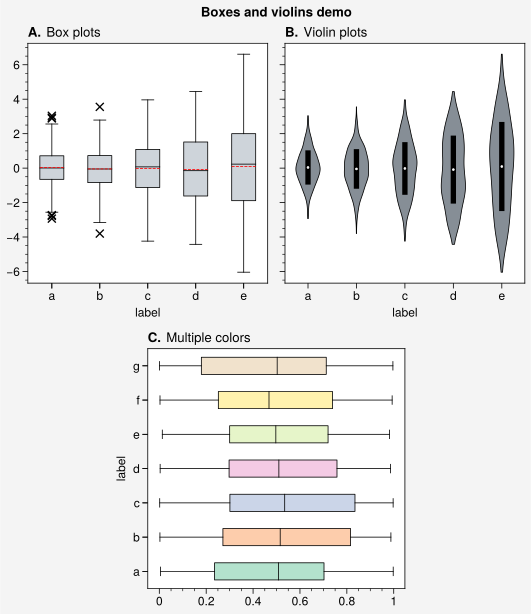
Vertical and horizontal box and violin plots can be drawn using
boxplot, violinplot,
boxploth, and violinploth (or
their new shorthands, box, violin,
boxh, and violinh). The
proplot versions employ aesthetically pleasing defaults and permit flexible
configuration using keywords like color, barcolor, and fillcolor.
They also automatically apply axis labels based on the DataFrame
or DataArray column labels. Violin plot error bars are controlled
with the same keywords used for on-the-fly error bars.
[3]:
import proplot as pplt
import numpy as np
import pandas as pd

# Sample data
N = 500
state = np.random.RandomState(51423)
data1 = state.normal(size=(N, 5)) + 2 * (state.rand(N, 5) - 0.5) * np.arange(5)
data1 = pd.DataFrame(data1, columns=pd.Index(list('abcde'), name='label'))
data2 = state.rand(100, 7)
data2 = pd.DataFrame(data2, columns=pd.Index(list('abcdefg'), name='label'))

# Figure
fig, axs = pplt.subplots([[1, 1, 2, 2], [0, 3, 3, 0]], span=False)
axs.format(
    abc='A.', titleloc='l', grid=False,
    suptitle='Boxes and violins demo'
)

# Box plots
ax = axs[0]
obj1 = ax.box(data1, means=True, marker='x', meancolor='r', fillcolor='gray4')
ax.format(title='Box plots')

# Violin plots
ax = axs[1]
obj2 = ax.violin(data1, fillcolor='gray6', means=True, points=100)
ax.format(title='Violin plots')

# Boxes with different colors
ax = axs[2]
ax.boxh(data2, cycle='pastel2')
ax.format(title='Multiple colors', ymargin=0.15)
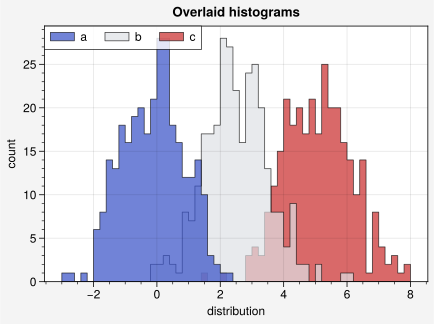
Histograms and kernel density
Vertical and horizontal histograms can be drawn with
hist and histh.
As with the other plotting commands, multiple histograms can be
drawn by passing 2D arrays instead of 1D arrays, and the color
cycle used to color histograms can be changed on-the-fly using
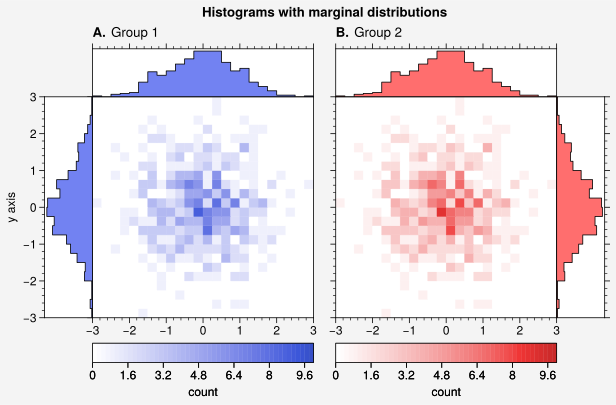
the cycle and cycle_kw keywords. Likewise, 2D histograms can
be drawn with the hist2d
hexbin commands, and their colormaps can
be changed on-the-fly with the cmap and cmap_kw keywords (see
the 2D plotting section). Marginal distributions
for the 2D histograms can be added using panel axes.
In the future, proplot will include options for adding “smooth” kernel density
estimations to histograms plots using a kde keyword. It will also include
separate proplot.axes.PlotAxes.kde and proplot.axes.PlotAxes.kde2d commands.
The violin and violinh commands
will use the same algorithm for kernel density estimation as the kde commands.
[4]:
import proplot as pplt
import numpy as np

# Sample data
M, N = 300, 3
state = np.random.RandomState(51423)
x = state.normal(size=(M, N)) + state.rand(M)[:, None] * np.arange(N) + 2 * np.arange(N)

# Sample overlayed histograms
fig, ax = pplt.subplots(refwidth=4, refaspect=(3, 2))
ax.format(suptitle='Overlaid histograms', xlabel='distribution', ylabel='count')
res = ax.hist(
    x, pplt.arange(-3, 8, 0.2), filled=True, alpha=0.7, edgecolor='k',
    cycle=('indigo9', 'gray3', 'red9'), labels=list('abc'), legend='ul',
)
[5]:
import proplot as pplt
import numpy as np

# Sample data
N = 500
state = np.random.RandomState(51423)
x = state.normal(size=(N,))
y = state.normal(size=(N,))
bins = pplt.arange(-3, 3, 0.25)

# Histogram with marginal distributions
fig, axs = pplt.subplots(ncols=2, refwidth=2.3)
axs.format(
    abc='A.', abcloc='l', titleabove=True,
    ylabel='y axis', suptitle='Histograms with marginal distributions'
)
colors = ('indigo9', 'red9')
titles = ('Group 1', 'Group 2')
for ax, which, color, title in zip(axs, 'lr', colors, titles):
    ax.hist2d(
        x, y, bins, vmin=0, vmax=10, levels=50,
        cmap=color, colorbar='b', colorbar_kw={'label': 'count'}
    )
    color = pplt.scale_luminance(color, 1.5)  # histogram colors
    px = ax.panel(which, space=0)
    px.histh(y, bins, color=color, fill=True, ec='k')
    px.format(grid=False, xlocator=[], xreverse=(which == 'l'))
    px = ax.panel('t', space=0)
    px.hist(x, bins, color=color, fill=True, ec='k')
    px.format(grid=False, ylocator=[], title=title, titleloc='l')